Pretty sure this has been asked before, but cannot find it. While the classic PP Consent Manager allows language customization for everything, it seems this does not apply for the “Customize” link (which opens the overlay to customize the consent settings). It also does not seem to behave according to the language logic that the other texts do. So we frequently see experiences like these where everything is in the language of the recipient, but the “Customize” link is still in English:
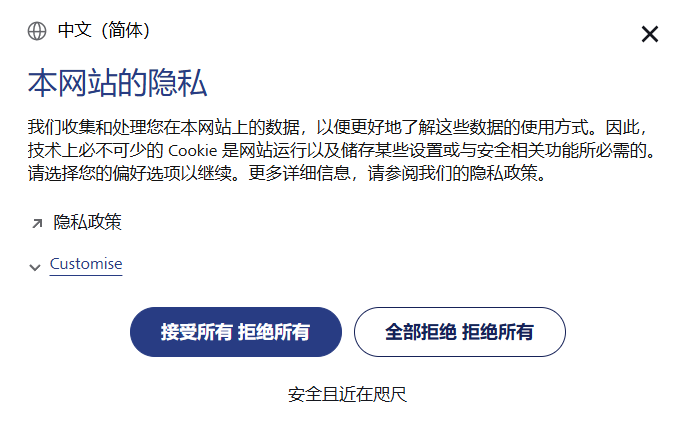
Hi @loldenburg,
It appears that the “Customize” link was added outside of the native Consent Manager template, indicating that the consent form is fully customized. As a result, translations aren’t applied automatically.
Could you please review how it’s implemented?
I am not aware of any outside customizations to the form. Inside of the PP Consent Manager Admin interface, there is no way to change the “Customize” text, even though every other piece of text can be changed.
@loldenburg - can you pass me site name and adress? I will take a look and see if there is some additional change added
@loldenburg I’ve send you the code I’ve found in your website JS that could be responsible for this problem
oh wow, I wasn’t aware of that. Thanks!
I guess this is really old ConTent Management System code. We will check this with the developers. But still: CAN the “Customize” Link text be changed or does this come hard-coded from PP? We don’t see such an option in the PP ConSent Manager.


It seems the “Detailed settings” and the “Customise” link can only be toggled/edited if the consent manager layout is “bottom bar”.
Yes, the “Customise” link is only supported in the “Bottom bar” template. If you’d prefer not to switch templates, here are some alternatives:
- Custom styling, as you’ve been doing so far.
- Using the custom consent form mode, which provides more flexibility but requires implementing the full logic yourself.
- Adopting the Cookie Information CMP, which offers a wider range of templates. Piwik PRO integrates with it via a dedicated built-in tag.
Thanks, that would have answered my question from the beginning… And that probably explains why some CMS developer resorted to custom styling some years ago.
Why would such an important text only be customizable in one of the templates? 

Asking people to switch the CM just because one little word cannot be changed feels a bit off tbh.
I understand. Since merging with Cookie Information and implementing recent pricing changes, we’ve decided to focus on developing a one CMP solution that provides the most value and best meets user needs. We’ve chosen to move forward with Cookie Information 